Posts

How to Root/Unroot Any Android Device in One Click without PC - Download Framaroot Apk ~ 360TECHGATES||Latest Techs News,Network Trickz and Trickz, WEBmaster Tutorials,

How to Root/Unroot Any Android Device in One Click without PC - Download Framaroot Apk ~ 360TECHGATES||Latest Techs News,Network Trickz and Trickz, WEBmaster Tutorials,

FREE IDM REGISTRATION ~ 360TECHGATES||Latest Techs News,Network Trickz and Trickz, WEBmaster Tutorials,

FREE IDM REGISTRATION ~ 360TECHGATES||Latest Techs News,Network Trickz and Trickz, WEBmaster Tutorials,

How to Make the App Icons on the Apple Watch Home Screen All the Same Size

Image
The Home screen on the Apple Watch is a large, fluid grid of app icons. As you move them around, icons on the outside rim get smaller than the icons in the middle. This can make it hard to tap the icon you want. However, this is easily solved. There is a setting, called “Reduce Motion”, that disables the resizing of the app icons, making all the icons on the Home screen all the same size. We’ll show you how to change this setting, which can be changed on your watch or phone. To change the setting on your watch, press the digital crown until you see the Home screen. Then, tap the “Settings” icon. On the “Settings” screen, tap “General”. Tap “Accessibility” on the “General” screen. In the “Vision” section of the “Accessibility” screen, tap “Reduce Motion”. Tap the slider button to turn the “Reduce Motion” setting on. The slider button turns green and white. Press the digital crown to return to the Home screen. The icons are all the same size now, even as you move them around. You can als...

How to Track Your Windows 10 PC or Tablet If You Ever Lose It

Image
How to Track Your Windows 10 PC or Tablet If You Ever Lose It Windows 10’s first big update in November 2015 added a device-tracking feature. You can now enable GPS tracking and remotely locate a lost Windows 10 tablet or laptop just like you’d track a smartphone, tablet, or MacBook. Previously, this required third-party software like Prey. Now, it’s integrated for everyone to use with a Microsoft account. It is off by default, so you will have to enable it before you lose your device. Limitations This also won’t work quite as well as a lost-smartphone-tracking solution. You can have your computer automatically check in and report its location, but it needs to be powered on and connected to the Internet to do so. A smartphone with a cellular data connection is always-on, always-connected, and can be more easily tracked. Before you enable this feature, be aware that it has some limitations. This is only a device-tracking solution, and it won’t allow you to remotely wipe or...

Upgrade Your Whatsapp to Smartest Chat

Image
let's switch t o smartestchat: Try this http://app.appsgeyser.com/smartestchat  The app is a bit like whatsapp.... But got some difference like wen setting up a display picture u don't need to crop it ..... U can change font size of your chat!!.... U can also change chat background!!..... And lots more just download and you will see more >awesome right....full time free!!not like whatsapp

FREE IDM REGISTRATION

Image
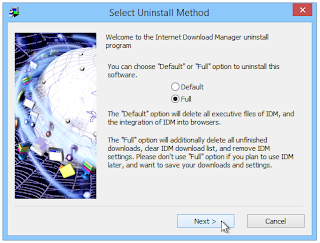
UPDATE: If you are starting to Register Your IDM or you have tried to register your IDM using This Method and it didn't work then read Section 1 of  Troubleshoot  Page This is the Detailed Method to Register Internet Download Manager Manually The Method is splitted into 4 Parts in which Part 3 and 4 are Important. Part 1: Note: If you have IDM Installed then use this method to Remove it Completely from your PC If You don't have IDM installed then skip to "Part 2" METHOD: Step 1: Uninstall IDM from Control Pannel Step 2: Open up "Run" Step 3: Type "regedit" and hit enter Step 4: Navigate to:  HKEY_CURRENT_USER > Software > DownloadManager Step 5: Delete "DownloadManager" Folder Part 2: Step 1: Go to  Google  Type "IDM" and  Download Latest version of IDM Step 2: Install IDM Setup Open IDM Setup Click Next Next Next Again Click Finish Click Close (after reading it) Step 3:  Open IDM Navigate To Registration Option and open i...